
Table of contents
Welcome AI is your intelligent assistant that transforms your recruiting experience. Available in one click, this tool helps you create job posts in minutes and automatically screen resumes. Discover how to make the most of Welcome AI to save time and improve the quality of your hiring.
Accessing Welcome AI
Welcome AI is accessible directly from the ATS main menu via the diamond icon in the left sidebar:
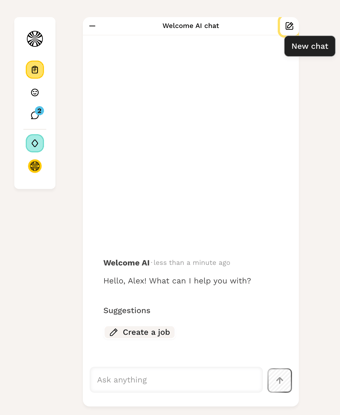
When you click on it, a conversation opens with a shortcut allowing you to create a job post.
💡 Good to know: Welcome AI is currently in beta, which means it is in a continuous learning phase. Its responses improve over time through usage and the context you provide.
Creating a job post with Welcome AI
Welcome AI allows you to automatically generate the details of a job post (role, candidate profile, recruitment process, etc.) in just a few minutes.
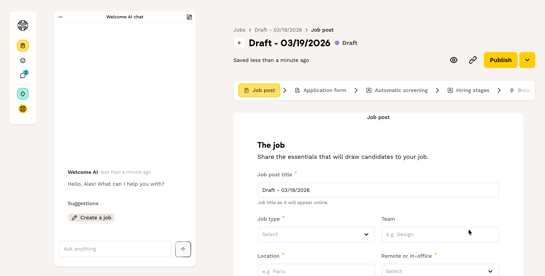
Best practices for optimal use:
- Be precise and provide as much context as possible: indicate at minimum the job title, city, seniority level, and a few lines explaining the challenges of the role.
- Share examples: you can copy/paste an existing draft job post or share the URL of a previous post. Welcome AI will use it as inspiration to generate the new one.
- Iterate with the AI: do not hesitate to correct, clarify, or rephrase your request if you feel the response is incomplete. Welcome AI learns from your interactions and previously published job posts.
- Smart form questions: Welcome AI can automatically suggest relevant questions to add to the application form based on the job post created.
- Automatic sorting criteria: Welcome AI can also suggest criteria to assign a score to your different candidate profiles.
- Always keep control: you can edit all the information on the job post at any stage.
Tips to optimize your usage
Be precise in your requests The more context you give Welcome AI, the more relevant and accurate its responses will be. Do not hesitate to detail your needs.
Correct and rephrase If the first response is not entirely satisfactory, rephrase your request or add more context. Welcome AI learns from each interaction.
Verify the information Although Welcome AI is very capable, it is in a learning phase. Always verify important information before validating it.
Use the feedback system Share your opinion directly in the conversation via the 👍 or 👎. If your experience is not optimal, provide more details to help us improve the tool.
⚠️ Current limitations of the beta version
Welcome AI is in a continuous learning phase, which means:
- Possible initial inaccuracies: the AI may sometimes lack context during the first interactions.
- Out-of-scope questions: if you ask a question outside of the available use cases, the agent will redirect you to the currently supported features.
- Security check: when creating job posts, the agent performs a check to detect possible biases or discriminatory elements.
💡 Welcome AI is currently learning. If you notice an anomaly or if an action is not yet available, do not hesitate to share your feedback with our Care team! Your feedback is valuable and will help us improve our algorithm.
❓ FAQ – Frequently asked questions
How do I access Welcome AI? Directly from the ATS main menu via the diamond icon in the left sidebar. A conversation will open with shortcuts to the available use cases.
Can I edit job posts generated by Welcome AI? Absolutely! You always keep full control and can edit all information at any stage of the job post creation process.
Does Welcome AI use my data confidentially? Yes, only aggregated and anonymized usage trends guide our roadmap. No sensitive data is exposed or shared.
What should I do if Welcome AI's response does not suit me? Do not hesitate to rephrase your question, provide more context, or correct the response. Welcome AI learns from your interactions. You can also use the 👍 👎 to share your feedback.
🆘 If you have any other questions, you can contact us via the support widget at the bottom right, or through the contact form at [this link].