
Table of contents
- ⚖️ Treat All Applications Uniformly
- Create a Common Evaluation Grid
- Standardize Screening Tools
- 📌 Organize Your Talent Pool
- Find Your Applications
- Organization Methods
- 📝 Regularly Maintain Your Application Pipelines
- Place Candidates in the Correct Columns
- Archive Regularly
- 📧 Responding to Applications
- Optimal Response Rate
- Recommended Response Time
- ❓ FAQ
⚖️ Treat All Applications Uniformly
Create a Common Evaluation Grid
To ensure fairness in processing applications, it is crucial to create a common evaluation grid based on clear criteria, weighted according to their importance.This grid allows you to:- Structure recruiters’ evaluations
- Strengthen fairness among all applications
- Provide constructive feedback to rejected candidates

Standardize Screening Tools
The ATS offers several features to organize your applications: Comments and Interview Notes 💬- Standardize your interview notes by harmonizing the questions asked
- Use the comments section to facilitate communication between recruiters
- ⚠️ Note: Use these fields responsibly, with no inappropriate references
 Custom TagsDefine together how you use tags:
- Build your talent pool (#languages, #skills, #values)
- Plan follow-ups (#September_2025)
- Track your KPIs (#Referral, #Team)

📌 Organize Your Talent Pool
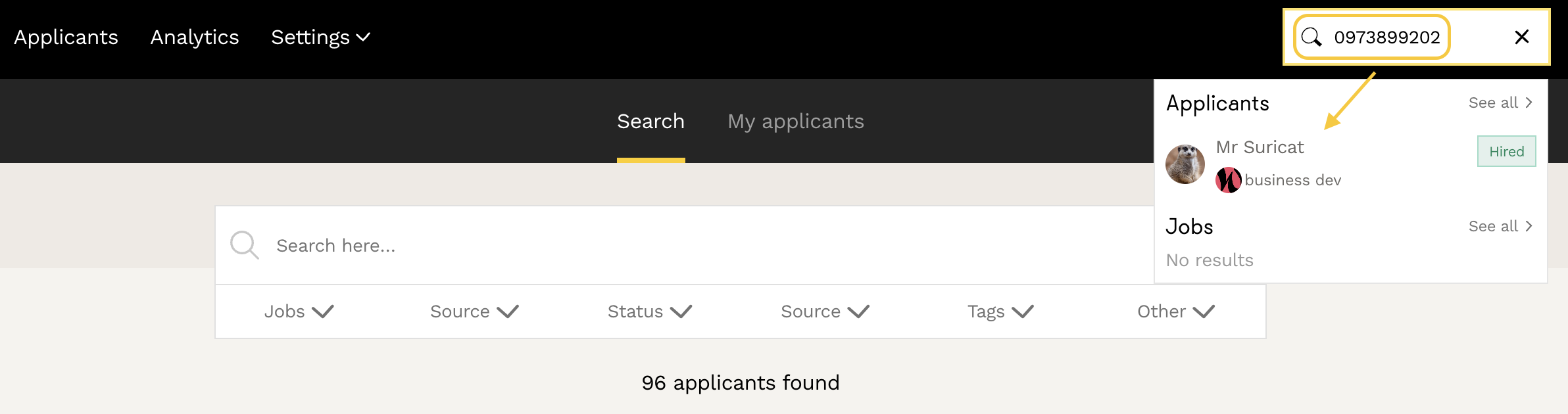
Find Your Applications
Go to the main Candidates tab in the ATS. Here, you’ll find:- Applications that have caught your attention
- Interesting profiles for future opportunities
- Manually added applications
Organization Methods
1. Using Tags- Apply tags to high-potential applications
- Examples: "To_followup_Spring_2025", "English", "Data", "React"
- Use filters to quickly find the desired profiles
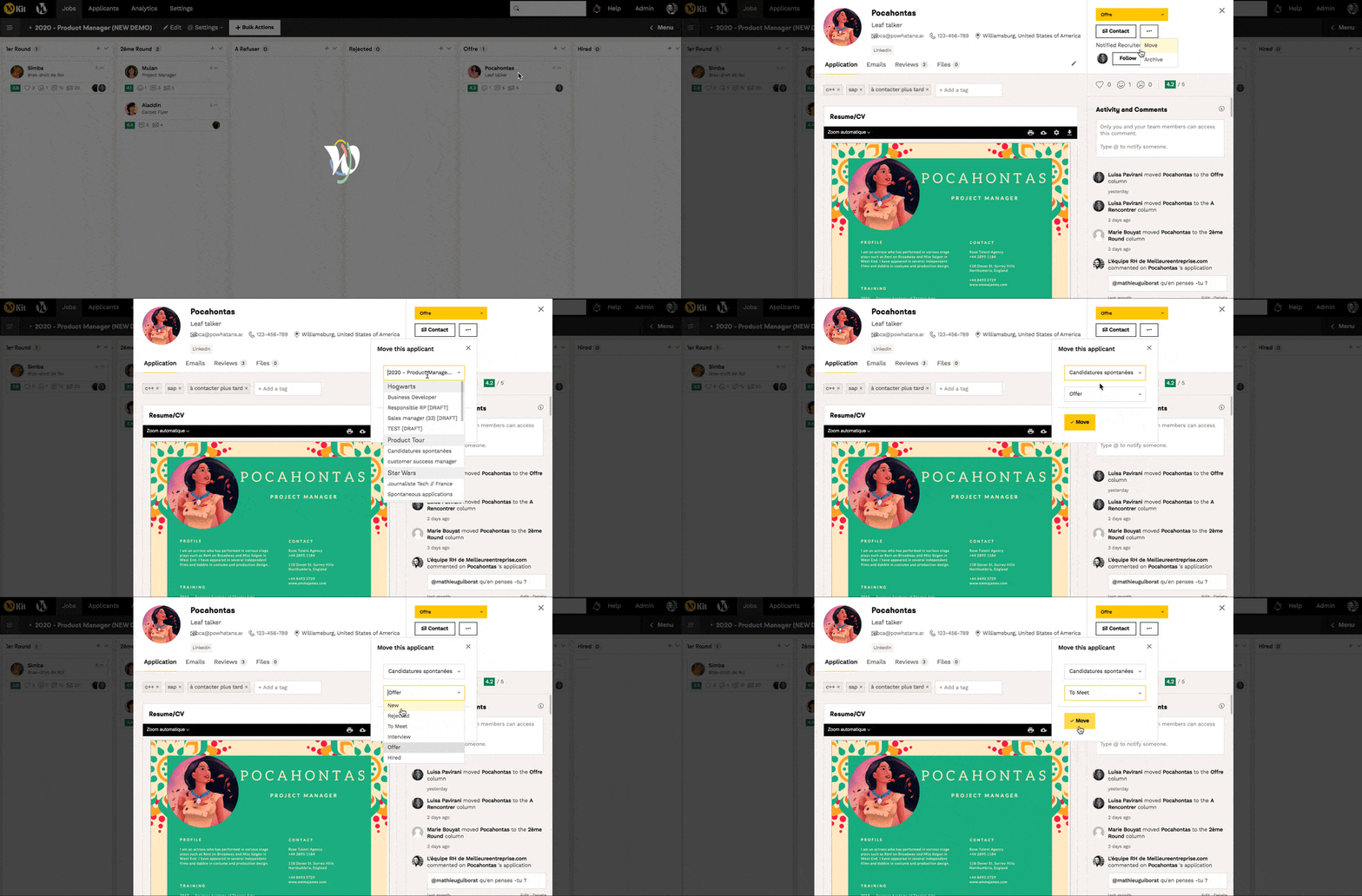
 2. Creating a Talent Pool Job Posting
- Create a “Draft” job dedicated to your CV database
- Move interesting applications to this posting
- Organize columns to categorize your candidates
- Contact all candidates in a column with one click
📝 Regularly Maintain Your Application Pipelines
Place Candidates in the Correct Columns
For reliable statistics, every processed candidate should end up in one of these final columns:- Rejected
- Hired
Archive Regularly
Best Practices:- Respond to all your candidates
- Regularly archive processed applications
- Don’t wait until you have 100 applications in a column before archiving
📧 Responding to Applications
Optimal Response Rate
Every company should aim for a 100% response rate to applications. The ATS makes this easier with:- Customizable email templates
- Bulk actions to process multiple applications at once
- Automatic status tracking in the candidate’s space
Recommended Response Time
- Goal: First response within 7 days maximum
- Benefit: Improves your employer brand
- Method: Daily processing of applications using the Kanban logic
❓ FAQ
How do I create an evaluation grid? Go to Settings > Candidate Pipeline in the ATS to set your evaluation criteria.
How can I find a specific application? Use the candidate’s phone number in the search bar of the Candidates tab.
What happens to archived applications? They remain accessible in your database via the Candidates tab with the appropriate filters.
How often should I archive applications? Archive regularly to keep the tool running optimally, without waiting for too many applications in a column.
How do I organize my talent pool? Use tags to categorize, or create a dedicated “talent pool” job with custom columns.
🆘 If you have further questions, you can contact us via the support widget at the bottom right, or via the contact form at this link