
Table of contents
- Why was the Hiring funnel created? 🔎
- What exactly does this section measure? 📏
- Filter and segment data in the Hiring funnel ⚙️
- FAQ ❓
- What are the definitions of the acquisition channels?
- Is benchmarking with other companies possible?
Why was the Hiring funnel created? 🔎
- the number of applications received via Welcome to the Jungle,
- the number of qualified applications,
- the number of hires made through Welcome to the Jungle.
What exactly does this section measure? 📏
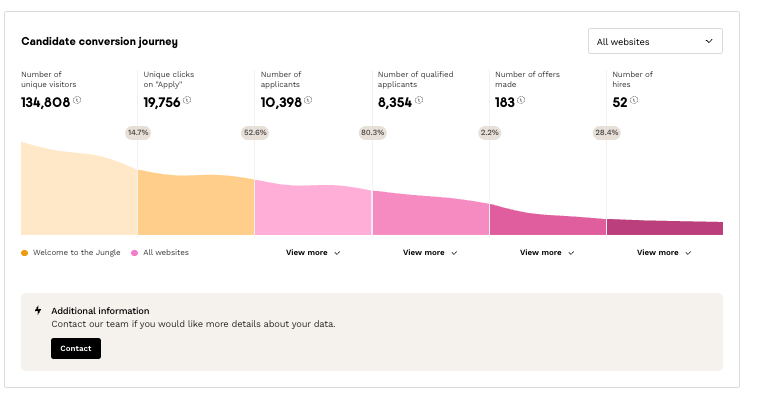
- Number of unique visitors to your job listings (who have viewed at least one job posting)
⚠️ Note this is not the number of visitors to your showcase but specifically to your offers in the “Jobs” tab. - Number of unique clicks on "Apply" (on job postings)
- Number of candidates (candidates in the pipeline with new status)
- Number of qualified candidates (status being processed)
- Number of offers sent (offer sent status)
- Number of hires (hired status)
Filter and segment data in the Hiring funnel ⚙️
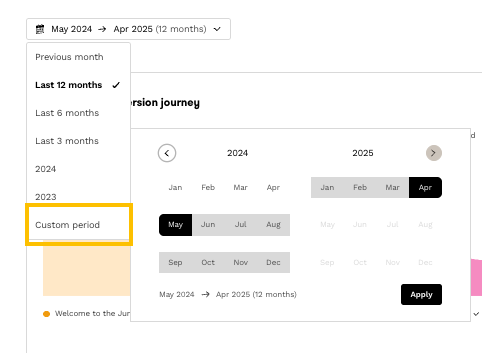
- Time period: as with our other charts, you can filter by period.
- Distribution by acquisition channel (exclusive to WttJ-ATS clients): direct access, multi-posting, sourcing, career site, external sites.
- All sites vs WttJ only (exclusive to WttJ-ATS clients): option to filter on all sites or only on Welcome to the Jungle.
FAQ ❓
What are the definitions of the acquisition channels?
- Direct access: application made directly from the Welcome to the Jungle job board
- Multi-posting: application from an external job board (LinkedIn, APEC, etc.).
- Sourcing: application created via the Sourcing product.
- Career site: application via the Welcome to the Jungle ATS career site
- External sites: other cases (manual addition, old Chrome extension, etc.).