
Table of contents
- 📊 Complete Export of Applications
- 📄 Individual Export of Application Data in CSV Format
- How to Proceed with Individual Export
- Important Reminder on Data Retention
- ❓ FAQ
📊 Complete Export of Applications
It is not possible to download all of your applications into an Excel file from the Welcome to the Jungle Solutions ATS. If you are switching ATS and need to export all your applications, we invite you to contact your account manager who can assist you in this process.📄 Individual Export of Application Data in CSV Format
Restricted Feature It is possible to export the data of an individual candidate, particularly to respond to potential requests for consultation of personal data from a candidate (within the framework of GDPR).How to Proceed with Individual Export
- Go to the profile of the relevant candidate.
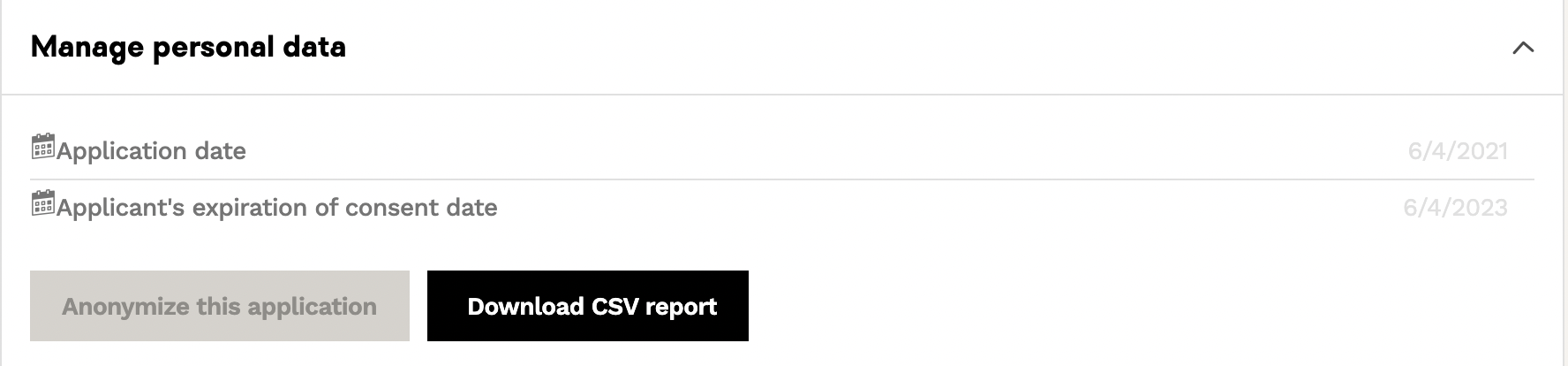
- Access the Application > Personal Data Management section.
- Click on the arrow at the bottom right to display the menu.
- You will then see:
- The application date
- The consent expiration date for personal data
- A "Download in CSV" button - Click on Download in CSV to obtain the file containing all the personal data of this application.
Important Reminder on Data Retention
Attention❓ FAQ
Q: Can I export all my applications at once?
A: No, it is not possible to export all applications. Contact your account manager if needed.
Q: Who can export application data?
A: Only users with Admin rights on Welcome to the Jungle Solutions ATS can perform this action.
Q: In what format is individual data exported?
A: The data is exported in CSV format, containing all personal information of the application.
Q: How long can I keep the exported file?
A: You must not keep the file beyond the candidate's consent duration, in accordance with GDPR.
Q: Where can I find the export option on a candidate's profile?
A: In the “Application > Personal Data Management” section, under the cover letter.
🆘 If you still have questions or doubts, you can contact us via the chat widget on the button right, or via our contact form at this link