
Each talent profile contains valuable information to assess the relevance of a potential candidate. This article guides you through navigating these profiles effectively and understanding all the available data.
Table of contents
Accessing the results list
When your search is launched, Talent Sourcing presents you with several results in list form. On this page, you can directly view the main information for each talent:
- First and last name
- Location
- Latest professional experiences
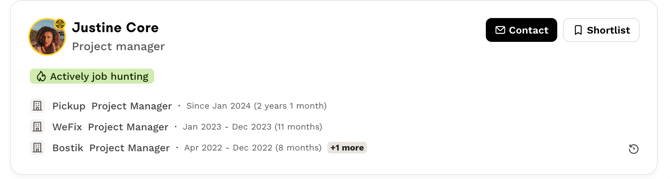
To view the complete details of a profile, simply click on the talent's name. Their profile will then unfold on the right side of your screen:
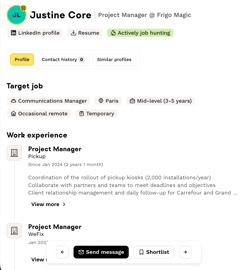
You can perform several actions from the detailed profiles:
- Contact the talent
- Add to favorites an interesting profile
- Hide a profile that doesn't match your needs
💡 Tip: If you click on the "Contact" button from the results list, you will be automatically redirected to the module for creating your message to the talent.
Detailed information available on each profile
Each talent profile contains numerous pieces of information to help you assess the candidate's relevance:
- Matching criteria: elements that correspond to your search
- The job sought by the talent
- Professional experience and skills
- Education and academic background
- Resources: CV, social networks (LinkedIn, etc.) or personal website
- Languages spoken
- Interests and hobbies of the talent
⚠️ Important: The seniority, skills, and salary range indicated on talent profiles are self-reported. This means that talents themselves entered this information when completing their profile.
Optimizing your outreach
We recommend contacting talents directly via Talent Sourcing to add elements from your company profile that will highlight your Employer Brand!
Adding personalized content such as interviews with your employees increases the response rate from talents by up to 40%.
To learn more about contact best practices, check out this article in our Help Center which details all the possibilities when you contact a candidate.
❓ FAQ - Frequently Asked Questions
-
How do I access the details of a talent profile? Click directly on the talent's name from the results list. The detailed profile will open on the right side of your screen.
-
What actions can I perform on a profile? You can contact the talent, add them to favorites, or hide their profile, directly from the results list or from the detailed profile.
-
What happens when I click on "Contact"? You are automatically redirected to the message creation module to contact the talent directly.
🆘 If you have other questions, you can contact us via the help widget at the bottom right, or through the contact form at this link.