
Table of contents
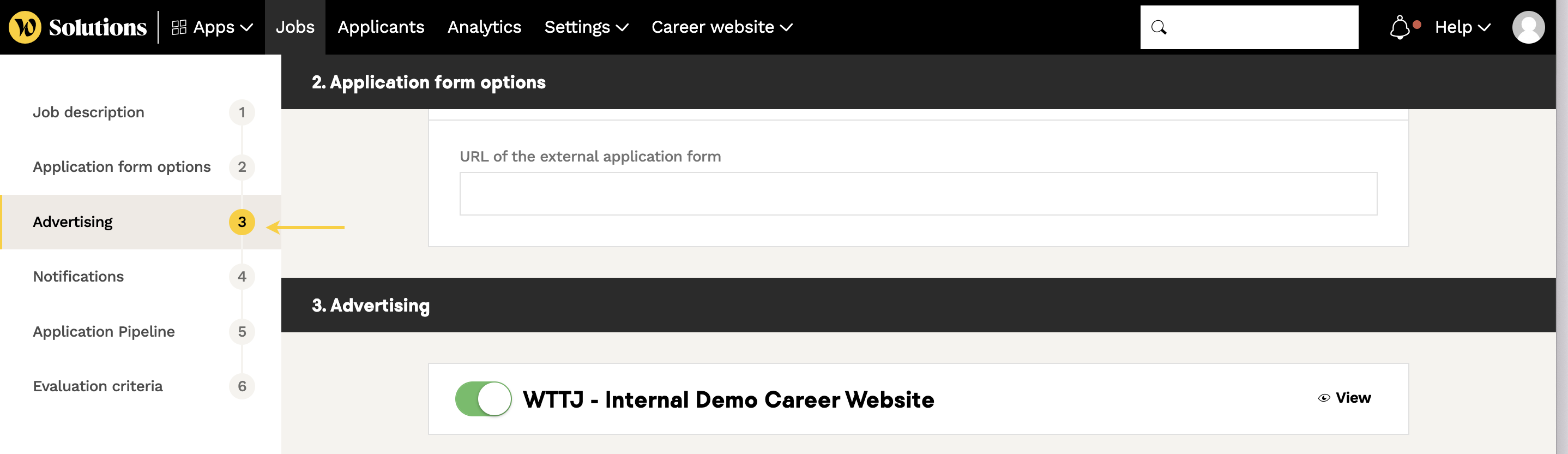
- 1 - Check the websites your job is broadcast on
- 2 - Edit & refresh the status of your job post
- 3 - Contact us
💡 If your job post is indicated as published, and it does not appear on your career website and/or Welcome to the Jungle, here is a how to fix it :
1 - Check the websites your job is broadcast on
The edition form allows you to publish your jobs on
- your Welcome to the Jungle profile
- your career website generated by the Welcome to the Jungle Solutions ATS
- one of Welcome to the Jungle partner job boards (Hub BPI, StartHer, Station F, ...).
⚠️ If none of these options is checked, your job will be considered as published but will not be visible to candidates.
2 - Edit & refresh the status of your job post
Another tip is to try to save the job post as a draft or to archive it, and republish it.
Once you have changed the job's status, wait 5 minutes before republishing it.
The changes made will appear within a few minutes, once the cache has been cleared (Shift + F5 for Windows and CMD/CTRL + Shift + R for Mac).
3 - Contact us
If none of these tips work, we suggest you to contact your account manager or contact us using the chat.