
💡 If you've heard about our newsletter, and you don't understand how you're not subscribed yet... This article is for you !
❓ What is the Newsletter about?
The Welcome to the Jungle Newsletter is sent out once a week and provides you with the latest news from the world of work, along with inspiring portraits and great tips for you. You will also learn about new companies and the most recent jobs posted on our website.
🤩 Subscribe to the Newsletter
At the bottom of the Welcome to the Jungle homepage, you will find the “Stay up-to-date!” footer. Simply fill in your email address and you’ll be subscribed to our Newsletter:

😢 Unsubscribe from the Newsletter
If you would like to unsubscribe from our newsletter, here's the procedure to follow:
- Open a newsletter as shown in the photo below (we promise, the newsletter subject has nothing to do with your wish to unsubscribe 😆)
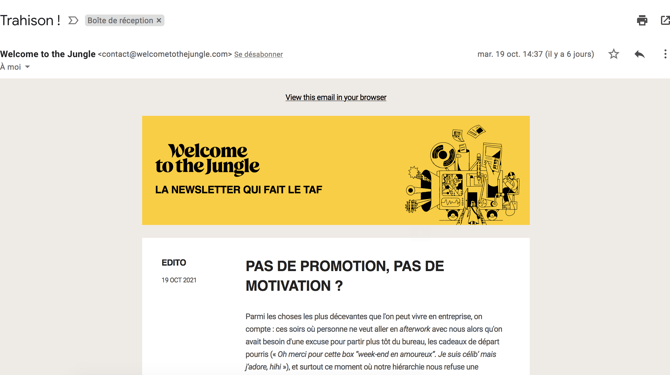
- And scroll down to the bottom of the page. You will see the "Unsubscribe" option appear.

- A window opens inviting you to update your subscriptions:
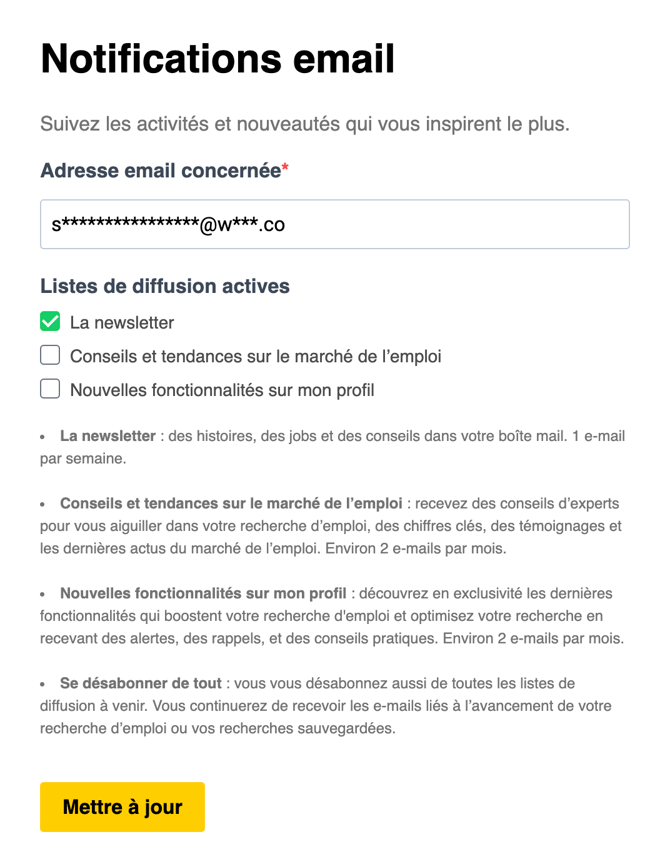
-
Select the lists you wish to subscribe to or unsubscribe from.
After clicking "Update", a confirmation message will appear:
⚠️ If you are unable to remove the newsletter, and after clicking "Unsubscribe", you still receive it, write to us so we can help you!
❓ FAQ - Frequently Asked Questions
⚠️ If you are unable to remove the newsletter, and after clicking "Unsubscribe", you still receive it, write to us so we can help you!
❓ FAQ - Frequently Asked Questions
How often is the newsletter sent? The Welcome to the Jungle newsletter is sent once a week.
What type of content will I receive? You will receive the latest news from the world of work, inspiring profiles, professional advice, company discoveries, and the latest job offers.
Where can I subscribe to the newsletter? You can subscribe directly at the bottom of the Welcome to the Jungle homepage, in the "Stay informed!" section.
How can I modify my subscription preferences? Open any newsletter, scroll down to the bottom of the page, and click "Unsubscribe" to access your subscription management.
What should I do if I can't unsubscribe? If after following the unsubscribe procedure you continue to receive the newsletter, contact us directly via the help widget or contact form.
🆘 If you still have questions or doubts, you can contact us via the chat widget on the bottom right, or via our contact form at this link