
Table of contents
Managing candidates’ personal data is a crucial issue for your organization. This article guides you through making your recruitment process GDPR-compliant, from collecting consent to anonymizing data.
⚖️ Understanding the GDPR Legal Framework
Since 2018, the GDPR regulation has imposed strict rules regarding the processing of candidates' personal data. Your organization must comply with several obligations:
- Obtain explicit consent from candidates
- Limit the retention period of data
- Allow the right to be forgotten
- Ensure transparency regarding data usage
The default retention period is set at 2 years, in accordance with the CNIL's 2002 decision.
👍 Configuring Candidate Consent
Setting up the Application Form
In the ATS > Settings > Legal & Compliance > Data Retention Settings, you can configure:
- The retention period for personal data
- The link to your privacy policy
- Details about your data retention policy

💡 It is strongly recommended to add a link to your privacy policy in the "URL" field provided for this purpose. This information must be easily accessible to candidates according to GDPR regulations.
⏰ Setting the Data Retention Period
Retention Period Configuration
You can adjust the retention period for personal data between 1 and 5 years from the Legal & Compliance tab:
- Click on the "Edit" button in the "Data Retention Settings" section
- Select the desired period from the dropdown menu
Application Rules
The logic is the same for:
- Candidates who applied via Welcome to the Jungle
- Candidates manually added (via Chrome extension or manual entry)
⚠️ Warning: If you choose a retention period longer than 2 years, you must be able to justify it to the supervisory authority.
🗑️ Anonymizing an Application
Manual Anonymization Process
Each candidate profile has an anonymization button in the "Personal Data Management" section:
- Access the "Application" tab of the candidate profile
- Locate the "Personal Data Management" section below the cover letter
- Click the arrow to display options
- Use the "Anonymize this application" button
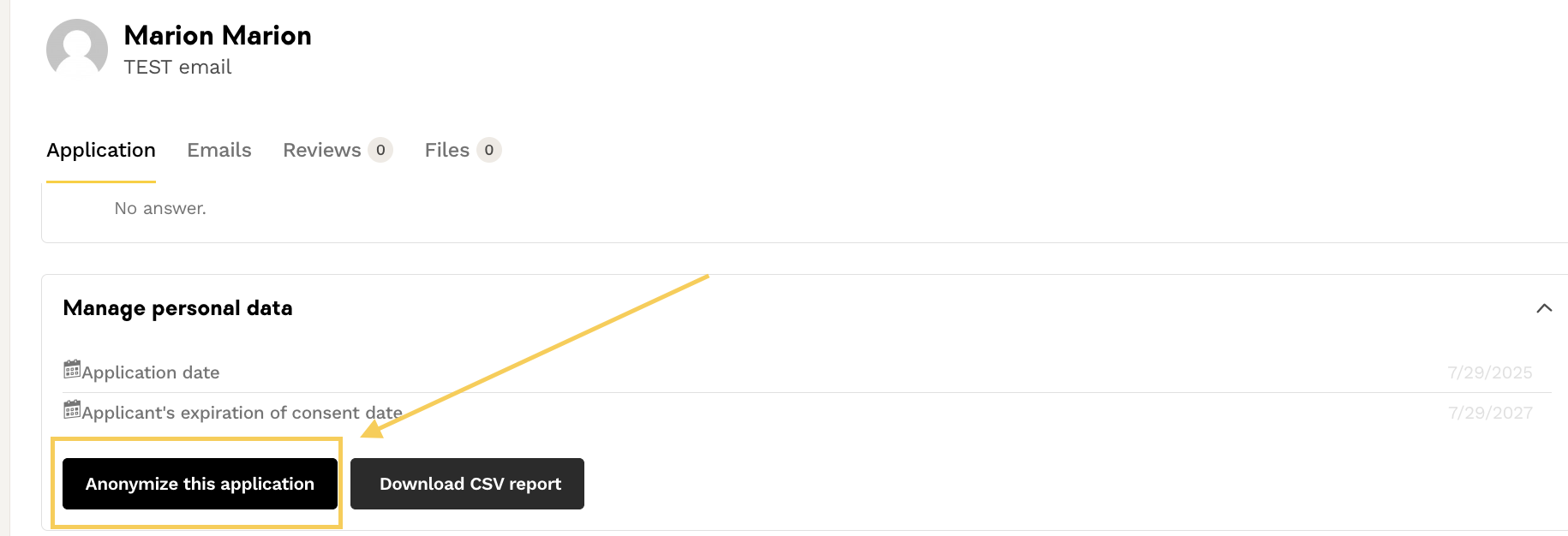
⚠️ Important: Anonymization is irreversible and erases all personal data (first name, last name, email, phone, CV, etc.) while keeping the application archived.
Automatic Anonymization
The system automatically anonymizes data at the end of the consent period. Applications are then archived and assigned a fictional character name.
🕵️ Finding a Candidate Profile to Anonymize
Search Method
When you receive a data deletion request:
- Copy the candidate's email address mentioned in the request email
- Paste it into the search bar in the "Applicants" tab in the ATS

If the Profile Does Not Appear
- Another ATS Administrator may have already processed the request (if no DPO is appointed, all ATS Administrators receive the requests)
- The profile may have been automatically anonymized by the system, as it reached the end of the consent period
Practical Tips
- Check that no data about this candidate is stored in other internal software
- Confirm to the candidate that their data has been deleted
- Consider appointing a DPO to centralize deletion requests
❓ FAQ
- What is the default retention period for candidate data? The default period is 2 years, according to CNIL recommendations.
- Can I change the data retention period? Yes, you can set it between 1 and 5 years in the Admin Area. Beyond 2 years, you must be able to justify this period to the supervisory authority.
- Is anonymization reversible? No, anonymization is final and irreversible. All personal data is erased.
- What happens if I can't find a candidate's profile to anonymize? The profile has probably already been processed by a colleague or automatically anonymized by the system when the consent period expired.
- Are manually added candidates treated differently? They follow the same retention rules, but do not receive a notification email when their data is deleted.
- How can I centralize deletion requests? By appointing a DPO in your organization, all requests will be addressed to them exclusively.
🆘 If you have any further questions, you can contact us on the support widget at bottom right!