
Table of contents
- 💳 Available billing options
- 🔧 Accessing billing settings
- 💰 Setting up your monthly direct debit
- ✏️ Updating your billing information
- ❓FAQ - Frequently Asked Questions
💡This article guides you through the complete management of your billing information and payment setup for your Welcome to the Jungle Solutions subscription. You'll discover how to set up your monthly direct debit and update your billing information.
💳 Available billing options
The use of Welcome to the Jungle Solutions ATS is included in your Welcome to the Jungle subscription with two payment options:
Annual Payment: The invoice for the total subscription amount will be sent by our finance team and must be paid within 30 days.
Monthly Payment by credit card or SEPA direct debit: We use Chargebee as a secure monthly direct debit tool.
🔧 Accessing billing settings
🔒 Prerequisites: To access billing settings, you must be logged in and have Administrator status at your organization level or the Billing Manager role on the Welcome to the Jungle Solutions ATS product.
To access billing settings:
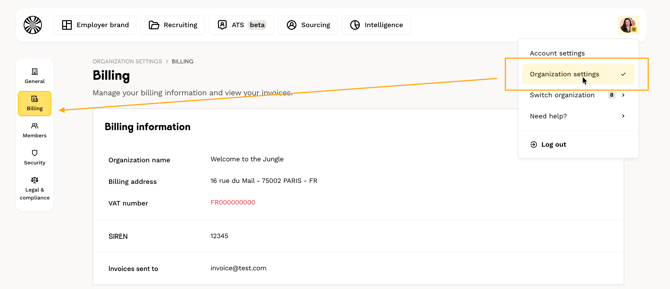
- Go to the Admin space
- At the top right of the screen, click on the icon with your photo
- Select the "Organization settings" tab
- Click on the "Billing" tab on the lateral menu on the left
Psst! To find out more about the different roles and how to change them, take a look at this article 👀 !
💰 Setting up your monthly direct debit
During the first installation of Welcome to the Jungle Solutions, a banner will invite you to fill in your banking information.
Once in the Billing tab, click on "Update payment method". You will be redirected to a new secure page where you can:
- For credit card payment: select the "Credit Card" tab
- For SEPA direct debit: select the "Direct Debit" tab
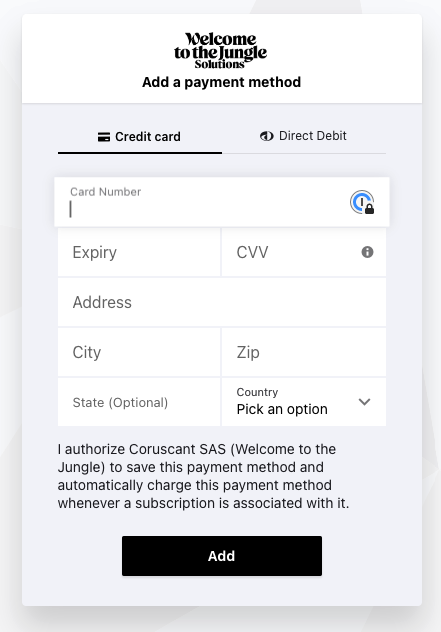
⚠️ Important: Entering your banking details automatically triggers the first monthly debit of your subscription. Subsequent debits will occur automatically every month on the same date.
🔐 Security: No information related to your credit card is stored in Welcome to the Jungle Solutions ATS. Payment is entirely secured on the Chargebee software.
✏️ Updating your billing information
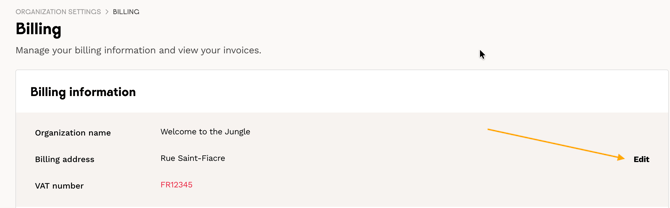
In the Billing tab, you can modify:
- The email address for invoice delivery
- The company address
- The VAT number
- Any other billing information
For French companies:
- The VAT number appears after filling in the "Country" field
- Enter only the numbers without adding "FR" and without spaces
⚠️ If you are not subject to VAT and cannot update your information, contact our Finance department: fr.receivable@wttj.co
Once your modifications are made, click on "Update" to save.

❓FAQ - Frequently Asked Questions
Q: When does the first debit occur?
A: The first debit is automatically triggered as soon as you enter your banking details.
Q: How often do debits occur?
A: Debits occur automatically every month on the same date as your first payment.
Q: Are my banking details secure?
A: Yes, no banking information is stored in Welcome to the Jungle Solutions ATS. Everything is secured via Chargebee.
Q: Who can modify billing information?
A: Only users with the Billing Manager role at the organization level can access and modify this information.
Q: How do I enter my French VAT number?
A: Enter only the numbers, without "FR" and without spaces.
Q: What should I do if I'm not subject to VAT?
A: Contact our Finance department at fr.receivable@wttj.co for assistance.
🆘 If you have any further questions, you can contact us using the support widget at the bottom right, or the contact form at this link