
Table of contents:
-
What is an employer brand asset?
-
The assets generator: create your content automatically
-
Brand assets: manage all your content
-
Media gallery: import your own content
-
FAQ
The Welcome to the Jungle platform provides you with powerful tools to create, manage, and distribute your employer brand content: the assets generator and employer brand assets. These features allow you to build a consistent and attractive identity to attract the right candidates.
What is an employer brand asset?
An employer brand asset is a content element that you can customize and reuse across our solutions: job posts, brand profile, messages, etc. They form the foundation of your employer brand identity on Welcome to the Jungle.
Available asset types
- Identity: essential information about your company.
- Culture & teams: elements reflecting your company culture and teams.
- Media: photo and video gallery.
The assets generator: create your content automatically
The assets generator is offered to you at the beginning of your onboarding on our platform. It uses artificial intelligence (AI) to automatically create your brand assets.
How does the generator work?
- The assets generator is displayed automatically when you have not yet created any assets.
- You can provide different types of information:
- Website URLs.
- Files (up to 32 MB in total).
- The AI analyzes your content and automatically generates your employer brand assets.
- All generated content is accessible and editable on your "Brand assets" page.
Regenerating assets
You can access the assets generator to regenerate all your assets if necessary.
⚠️ Warning: When you choose to regenerate all your assets, you delete all your existing assets. This action should be taken with caution.
Traceability of generated content
When an asset has been generated by AI, a notice is displayed showing the sources used to create it.
Good to know: The AI is designed not to invent information when it does not have the necessary data. However, as with any AI technology, we cannot guarantee 100% absolute accuracy.
Brand assets: manage all your content
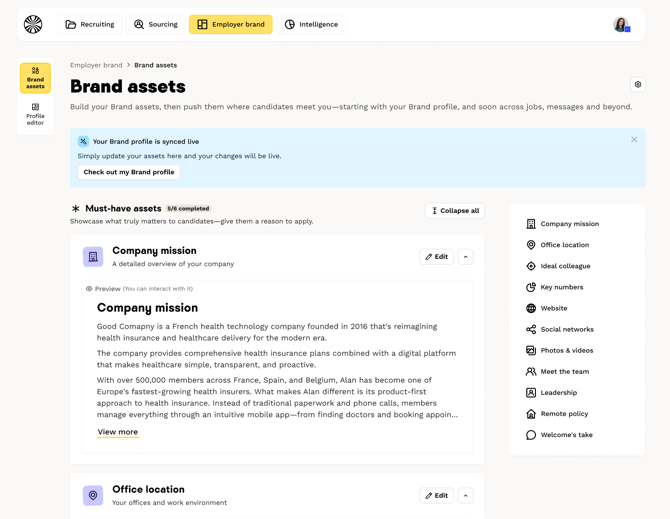
The "Brand assets" page centralizes all your employer brand content (text, photos, and videos). It replaces the assets generator as soon as you have created at least one asset.
Features
In this section, you can:
- Create new assets.
- Edit your existing assets.
- Delete assets.
Organization
Assets are organized into several categories to facilitate navigation:
- Identity.
- Culture & teams.
- Media.
Asset states
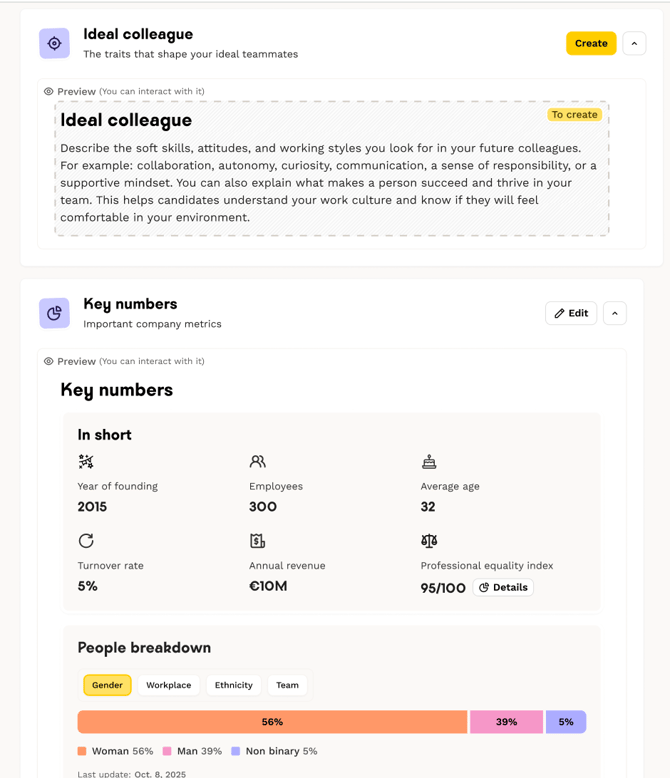
Empty asset: When an asset has not yet been completed, an empty state is displayed with an example of what it could look like once finished.
Edit forms: Forms tailored to each asset type allow you to complete them easily.
Real-time preview: While you type, the preview panel on the right updates instantly to show you how the asset will appear to candidates.
Media gallery: import your own content
From the media gallery, click "Import" in the top right corner. You will then be redirected to our contact form to submit your media addition request. Once your request is received, our teams will publish your content to make it quickly available from the asset library.
Access requirements
This feature is only available to customers who have previously subscribed to Welcome to the Jungle content.
❓FAQ
What is an employer brand asset? An employer brand asset is a reusable content element (text, image, video) that feeds your company page and your job descriptions.
How does the assets generator work? The assets generator uses AI to automatically create your content from the URLs and files you provide. The generated content can then be edited on the "Brand assets" page.
Can I edit automatically generated assets? Yes, all content generated by AI is fully editable from the "Brand assets" page.
What happens if I regenerate my assets? Regeneration deletes all your existing assets and creates new ones. This action is irreversible, so use it with caution.
Can I upload my own photos and videos? Yes, if you have already subscribed to Welcome to the Jungle employer content and have completed at least one shoot.
Where are employer brand assets used? Currently on your company pages, and soon in your job descriptions.
🆘 If you have any other questions, you can contact us via the support widget in the bottom right corner, or through the contact form at this link.