
Table of contents:
-
What is the Profile editor?
-
How does the Profile editor work?
-
How do I access the Profile editor?
-
What is the employer brand profile?
-
FAQ
Discover how to use the new Profile editor to create and customize your employer brand profile, visible to all candidates!
What is the Profile editor?
The Profile editor is where you build and manage the profile that candidates see on Welcome to the Jungle.
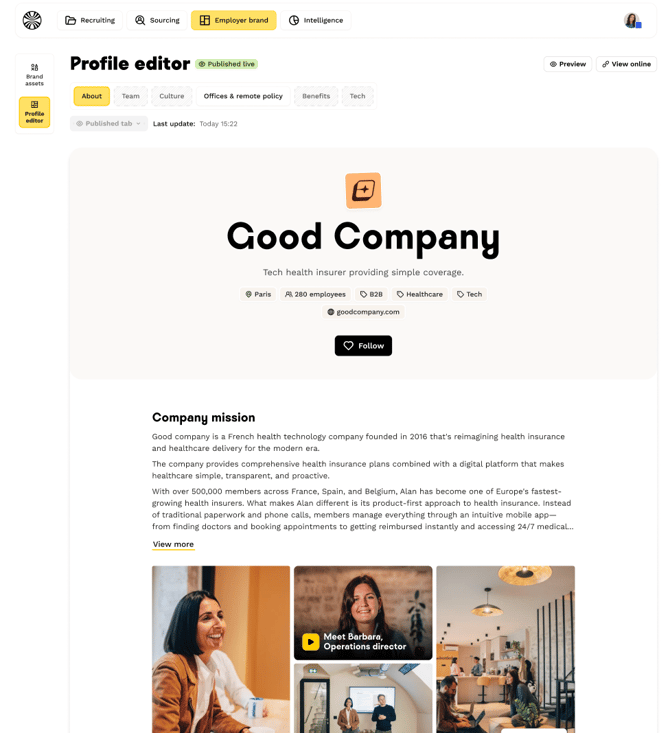
How does the Profile editor work?
Two types of content available
The editor lets you add:
- Brand assets: Reusable visual and text elements (photos, videos, descriptions) generated during your onboarding.
- Text content blocks: Editorial content you create directly, visible only on your brand profile.
Automatic pre-filling
Once your brand assets are generated during your onboarding journey, we automatically pre-fill the editor with these elements. You can then edit, complete, or reorganize them as needed. (link to "Brand assets" page)
Tab organization
The editor maintains existing tab templates to structure your profile:
- About.
- Teams.
- Tech.
- Culture.
- Benefits.
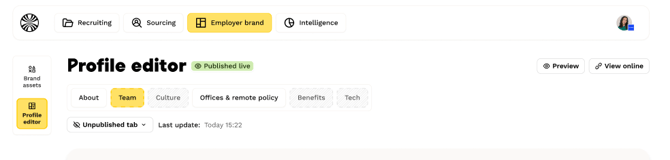
Each tab has an independent publication status, allowing you to publish certain tabs while continuing to work on others.
However, to publish your brand profile, you must have at least the "About" tab published.
How do I access the Profile editor?
There are two ways to access the Profile editor:
- Directly from the "Profile editor" entry on the Welcome Employer Brand
- Via a smart link in your onboarding journey, from the "Brand assets" page.
What is the employer brand profile?
The employer brand profile is the company page visible to candidates on the Welcome to the Jungle platform. It is an exact reflection of the content you have created in the Profile editor.
Profile characteristics
- You can add images and videos from your Welcome to the Jungle shoots, if you've subscribed to content creation. You'll also be able to add your own content.
- Can contain text, or be entirely text-based, depending on your preference.
- Includes a Jobs tab with a list of your job posts and an advanced search.
- Allows candidates to follow your company.
- Gets automatic SEO so candidates find you more easily
- Accessible via company searches and job descriptions.
FAQ
What types of content can I add to my profile? You can use two types of content: brand assets (images, videos, text) and text content blocks that you create directly.
Is my profile automatically pre-filled? Yes, once your brand assets are generated during your onboarding, the editor is automatically pre-filled with these elements.
Can I publish my tabs independently? Yes! Each tab has its own publication status, so you can publish some while you're still working on others.
How do candidates see my profile? Candidates see your employer brand profile directly on Welcome to the Jungle.
Does my profile have to include images and videos? No, your profile can include images and videos, or be entirely text-based, depending on your needs and preferences.
🆘 If you have any other questions, you can contact us via the support widget at the
bottom right, or through the contact form at this link.