
Table of contents
- What is the careers page?
- How do you access your careers page?
- How do candidates apply through your careers page?
- FAQ
Your careers page is the showcase for your professional opportunities. It allows your candidates to browse all your published job posts and apply easily online. Find out how to access, manage, and share your careers page and your job posts.
What is the careers page?
Every company has a careers page that lists all published job posts. This page, which works independently from your Welcome to the Jungle company profile, is accessible to candidates and presents your opportunities in a clear and attractive way.
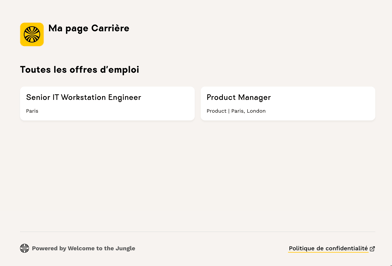
Each job post has its own public page, which contains:
- Full job post details (position description, candidate profile, benefits, etc.).
- The customized application form.
- Your privacy policy information (GDPR).
You can share the URL of each job post on social media, by email during a recruitment campaign, or directly with your colleagues.
🔜 Coming soon: In the coming months, you'll be able to benefit from employer branding assets available on our marketplace to further showcase your employer brand.
How do you access your careers page?
To view your careers page as your candidates see it:
- Go to the ATS.
- Click on Job posts.
- Click on View on site.

You'll find all job posts with the status published there.
💡 Good to know: Only job posts with the "Published" status appear on your careers page. Job posts in draft or archived status are not visible to candidates.
How do candidates apply through your careers page?
When a candidate accesses a job post on your careers page, they can view all the details of the position and then apply directly via the Application tab.
The fields displayed to candidates are those you selected when creating the job post:
- Name and email address (required by default).
- Additional fields you've added.
- Custom questions (text or yes/no format).
- Resume and cover letter.
After submitting their application, the candidate can return to the list of available job posts.
❓ FAQ
-
Where can I see my careers page? Go to the ATS, click on "Job posts," then "View on site."
-
Which job posts appear on my careers page? Only job posts with the "Published" status are visible on your careers page. Job posts in draft or archived status remain private.
-
How do I share a specific job post? You can copy the link to a job post by clicking the 🔗 icon when editing, or via the "…" menu from the job posts list.
-
Can candidates apply directly from the careers page? Yes, each job post has an integrated application form with the fields you've configured.
-
Does my privacy policy appear on my careers page? Yes, the link to your privacy policy (configured in Settings) will be visible on your careers page and on each job post.
🆘 If you have any other questions, you can contact us via the support widget at the bottom right, or via the contact form at this link.