
Table of contents
Welcome Sourcing lets you search for and contact candidates directly from your Admin Space. Describe who you're looking for, fine-tune with filters, and start the conversation with the profiles that best match your hiring needs.
Methods for searching
⚠️ Searches are not saved. If you find interesting talent profiles, add them to your shortlist before leaving the interface or clearing your search.
Sourcing by describing your ideal profile to our AI
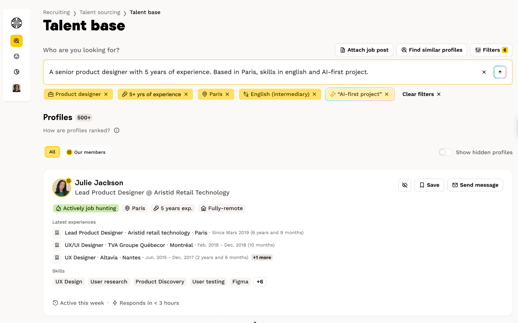
This is the quickest way to start. Welcome AI compares the profile you describe with the talent available on our platform.
-
Describe your ideal profile in the text field. To get relevant results, structure your request as follows:
Mandatory elements:
- A job title (e.g., “Full-Stack Developer,” “Communications Officer”)
- A seniority level (e.g., “junior,” “mid-level,” “senior”) or a required number of years of experience.
Give us these two and you'll get relevant talent suggestions right away.
Optional elements to refine:
- Location
- Desired education level
- Technical or soft skills
- Required languages
- Salary range
Our AI will analyze your request, compare it with our talent base, then pre-fill the various search filters and propose a list of talents that match your search.
💡 Tip: You can copy and paste a full job description directly into the search field. The AI will automatically extract the relevant information. You can then fine-tune results by adding or removing filters.
⚠️ Limitation: The “Job title” and “Seniority level” filters cannot be modified from this interface. To change them, you must start a new search from the initial prompt.
Sourcing from a job posting (published, draft or archived)
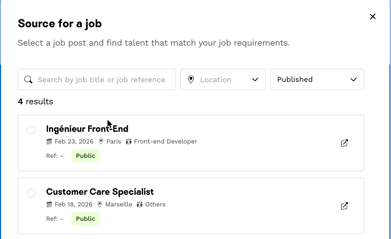
Pick any job posting from your list, whether it's published, archived or still a draft. The search filters are filled in automatically based on the job's context, so you can start reviewing talents straight away.
You can always adjust the filters to refine your search.
Sourcing similar talents
Found a great profile on social networks? Paste its URL and we'll suggest talents with similar backgrounds and skills.
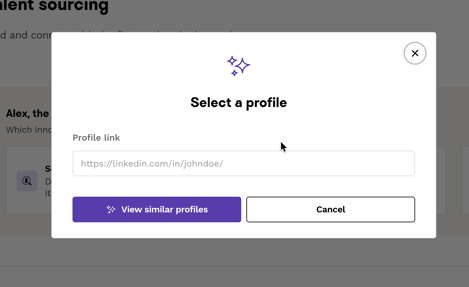
We compare the reference profile’s past experiences to propose talents who are the closest match.
Where do the profiles come from? All talents in Welcome Sourcing come from the Welcome to the Jungle talent base. These are users who created a Candidate hub on our platform and voluntarily completed their profiles. Their information is up to date, and they are generally open to professional opportunities.
Sourcing using search filters
Once the initial results are displayed, you can adjust your criteria using more than 15 filters available on the platform:
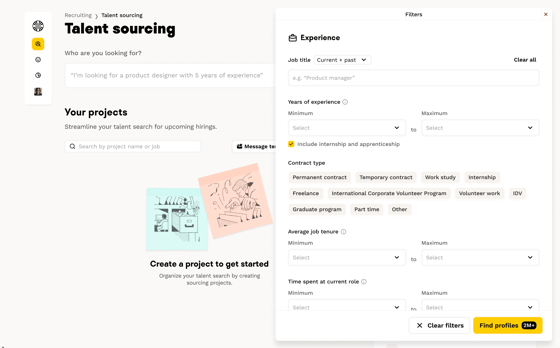
- Click the “Filters” button on the right side of the screen
- A side pop-up window opens
- Modify the desired filters
- Results update automatically
Understanding the search filters
Welcome Sourcing offers two types of filters to refine your results:
Excluding filters
These filters eliminate profiles that do not meet the defined criteria. If a talent doesn’t have the required information, they won’t appear in your results.
- Job title: the role or profession you’re searching for. You can add several; we’ll search for talents who have at least one of them.
- Location: city with a customizable search radius
- Seniority: the talent’s level of experience. We calculate experience level by adding up the durations of past roles. You can exclude internships and apprenticeships from the calculation.
- Job type: contract type (permanent, fixed-term, freelance, internship, apprenticeship)
- Talent status:
- Actively looking: proactive candidates, very responsive to opportunities
- Open to opportunities: open but not actively searching
- Remote work: accepted remote-work arrangements
- Languages: languages required for the role
- Annual salary: expected compensation range
- Tenure: average length of time in previous roles
- Time in role: time spent in the current position
Adjustable filters
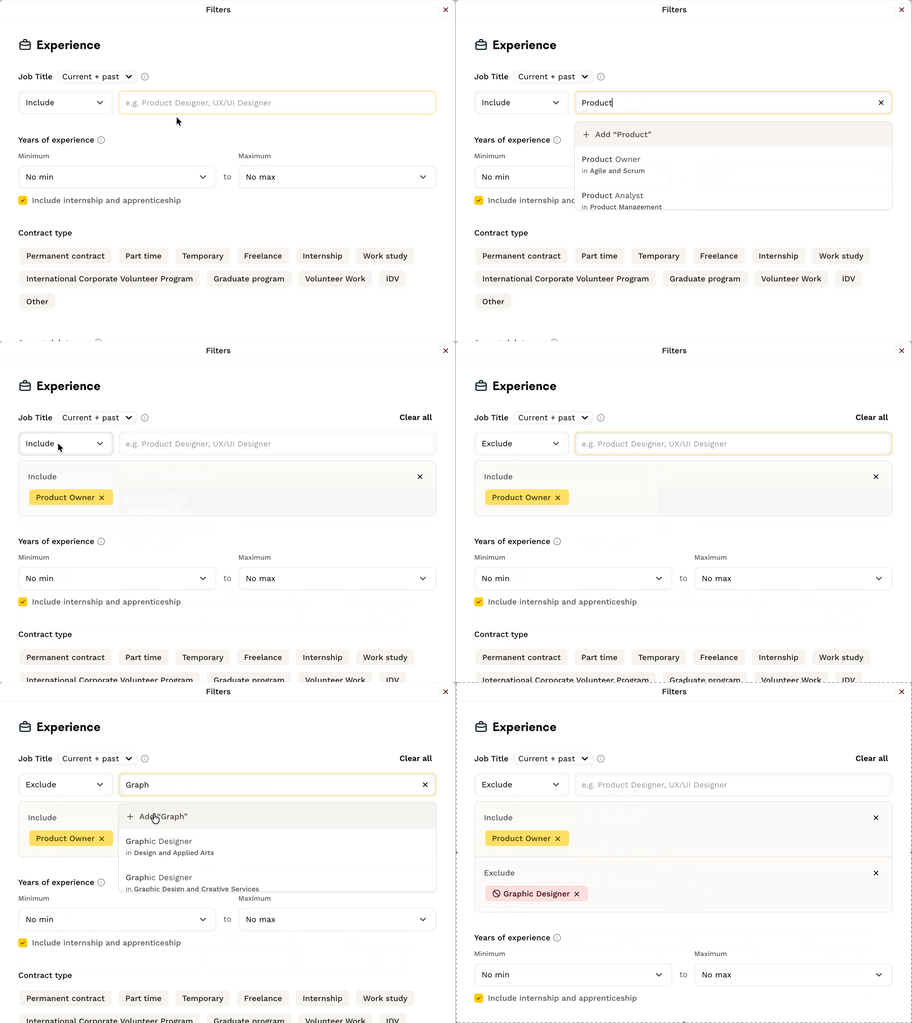
These filters let you include or exclude search criteria. This option applies only to the following filters:
- Job title
- Company name
- School or university name
When setting your criteria via the filter-based search, use the “Include” or “Exclude” button to add the items you want to show or hide in talent profiles.
Relevance filters (result optimization)
These filters are not excluding; they rank talents by relevance. The best-matching profiles appear first.
- Skills: software, technical tools, and abilities sought
- Keywords: specific terms to search across the entire profile
- Profile completion: level of completeness of the candidate profile; the more complete the profile, the higher it appears in results.
- Last activity: date of last login to the Candidate hubfa and last profile update
💡Skills and keywords can be set as optional or mandatory.
FAQ
-
What minimum information is required to start a search? You must provide at least a job title and a seniority level. You can then add other criteria to narrow your results.
-
Are my searches saved? No, searches are not saved. Be sure to add interesting profiles to your shortlist before leaving the interface or clearing your search.
-
What’s the difference between excluding filters and relevance filters? Excluding filters remove profiles that don’t meet the defined criteria, while relevance filters rank talents by relevance without excluding them.
🆘 If you still have questions or doubts, you can contact us via the chat widget on the button right, or via our contact form at this link