
Table des matières
- What is changing with the new profile
- What happened during the migration
- The three steps to publish your new profile
- How to access the new Profile editor
- FAQ
🎉What is changing with the new profile
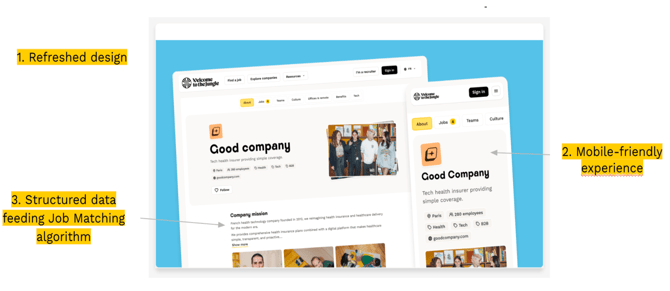
The new employer brand profile includes three major improvements:
- A refreshed design: An immersive, modern interface designed to encourage candidates to join your company from their first visit.
- A mobile-friendly experience: Vertical formats optimized for browsing on smartphones.
- Structured content that supports Welcome Job Matching: Your profile now feeds the Welcome Job Matching algorithm. The more complete your profile, the better the matches with relevant candidates.
🔄 What happens during the migration
When the new editor becomes available for your account:
- The old editor disappears, and you automatically access the new Profile editor.
- Your content is migrated automatically, but minor errors may remain, especially in the Tech tab, which is more complex. Review your content carefully.
- Your current profile remains online until you click Publish. Candidates continue to see the previous version while you work on the new one.
- The migration is not mandatory. You can take the time to review your content before publishing. However, if you want to update your content, you must do so in the new editor and publish the new version.
✅ The three steps to publish your new profile
Step 1 — Review and update your content
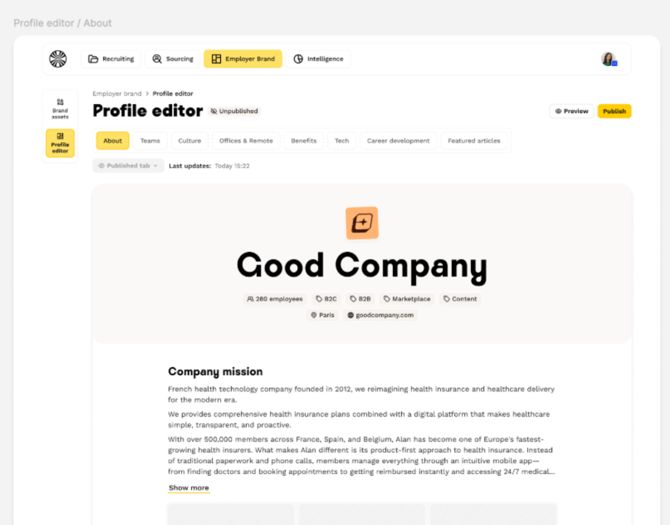
Log in to the Profile editor and review all the tabs in your profile: About, Teams, Culture, Offices & remote work, Perks & benefits, Tech, and Featured articles. Check that your text, images, and videos are accurate and up to date.
💡 The editor is organized into tabs. Each tab has an independent publication status, which allows you to publish some tabs while continuing to work on others.
Step 2 — Set each tab to “Published”
For each tab that you want candidates to see, change its status to Published.
Please note that you must set the About tab to Published before you can publish your profile.
Step 3 — Click “Publish”
Once your tabs are ready, click the Publish button in the top-right corner of the editor. Your new profile immediately replaces the previous version and becomes visible to all candidates on Welcome to the Jungle.
🔎 How to access the new Profile editor
You can access the Profile editor in two ways:
- Directly from the Profile editor entry in the Employer Brand platform.
- Through the link in your onboarding journey, from the Brand modules page.
❓ FAQ
Will my old profile disappear immediately?
No. Your current profile remains online and visible to candidates until you click Publish in the new editor. You can take the time to review your content before switching to the new version.
Was my content transferred automatically?
Yes. Your existing content was migrated automatically to the new editor. However, minor errors may remain, especially in the Tech tab. We recommend reviewing all your tabs before publishing.
Do I have to migrate immediately?
No. The migration is not mandatory. Your old profile remains active. However, if you want to edit your content, you must do so in the new editor and publish the new version.
Can I publish my tabs one by one?
Yes. Each tab has an independent publication status. You can publish some tabs while continuing to work on others. The About tab is the only one required to publish your profile.
How will candidates see my new profile?
Once published, your new profile becomes immediately visible on the Welcome to the Jungle platform. It replaces the previous version and reflects the content created in the Profile editor.
Does the new profile improve my visibility among candidates?
Yes. The structured content in your new profile feeds Welcome Job Matching. The more complete your profile, the better the matches with relevant candidates.
🆘 If you have any other questions, contact us through the support widget in the bottom-right corner or through the contact form at this link.